
Blog on a Subdomain or a Subfolder? blog.yourbrand.com vs yourbrand.com/blog
You've bought the domain, the landing page is live, and now someone on the team says: "Let's start a blog." Before the first post goes out, you face a decision that is annoying to reverse: does it live at blog.yourbrand.com or at yourbrand.com/blog? Most founders pick whatever their CMS defaults to. That's a mistake, because the choice quietly decides whether every article you write strengthens your main site or builds a second, separate site from scratch. Our rule is simple: unless you have a specific technical reason, use the subfolder. Here's why, and the exceptions.
Add ZeroTaken as a preferred source on Google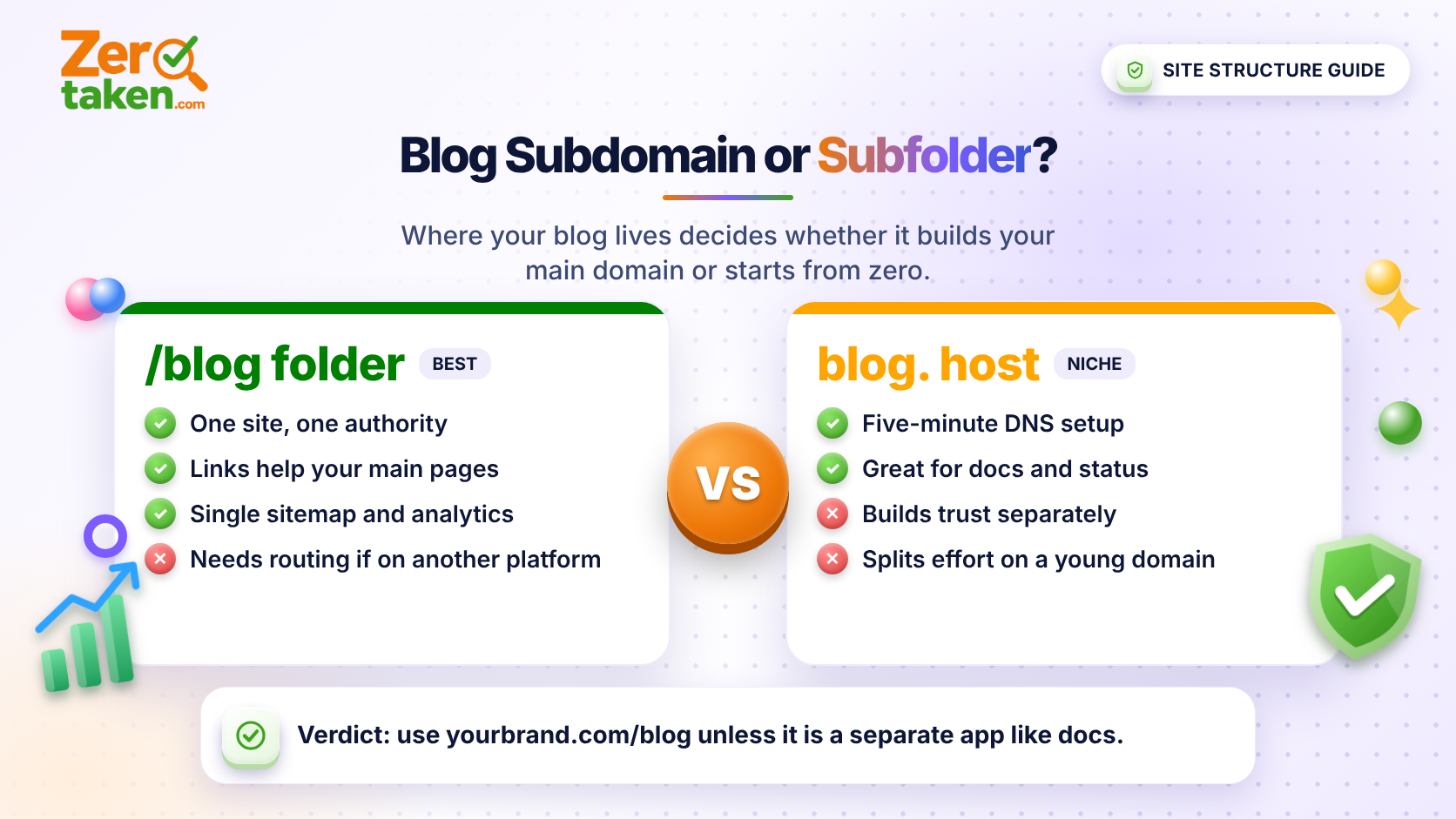
What is the actual difference between a subdomain and a subfolder?
A subfolder (also called a subdirectory) is a path on your main domain: yourbrand.com/blog/your-post. A subdomain is a separate hostname in front of it: blog.yourbrand.com/your-post. To a visitor they look almost identical. To a search engine and to your infrastructure, they are not.
A subfolder is part of the same site as your homepage and pricing page. A subdomain is technically its own host, which means its own DNS record, its own SSL certificate, its own analytics property by default, and often a different server or platform entirely.
That last point is why subdomains are so common: pointing blog.yourbrand.com at a hosted blogging platform takes one DNS record and five minutes. Getting yourbrand.com/blog to serve content from a different platform takes a reverse proxy or routing rule. Convenience is the reason people choose a subdomain, not strategy.
Which one is better for SEO?
Google has said for years that it can treat subdomains and subfolders fairly, and that either can rank. That's true in the narrow sense: a subdomain blog can rank. The practical problem is that you start the race behind. Links, mentions and trust you earned for yourbrand.com don't automatically flow to blog.yourbrand.com the way they do to a path on the same host. In practice, many teams that moved from a subdomain to a subfolder report their blog traffic climbing afterward, and we've rarely seen the reverse story.
The logic is easy to follow even without any ranking-factor claims. A subfolder means one site, one set of backlinks, one authority to build. A subdomain means you may be splitting your effort across two properties and asking each one to earn trust separately. For a startup with a handful of backlinks, splitting is the last thing you want.
There's also an internal-linking benefit. Linking from a blog post to your pricing page, and from your homepage to your best articles, is simple and natural when everything lives on one host. It's also easier to keep one sitemap, one robots.txt and one canonical setup.
- Subfolder: one site, one authority, one sitemap, simpler internal linking
- Subdomain: separate host, separate trust signals, separate analytics by default
- Both can rank, but the subfolder gives a young domain fewer things to prove
When does a subdomain actually make sense?
A subdomain is the right call when the content is genuinely a different product or has a different technical life. A few honest examples:
Your blog runs on a platform that cannot be served from a path on your main host and you can't set up a proxy. In that case a subdomain beats no blog. Your documentation, status page or help center is a separate application with its own team and deploy cycle (docs.yourbrand.com, status.yourbrand.com). Those are tools, not marketing content, and a subdomain is perfectly normal. You run a community forum or a user-generated content site with moderation risks you want walled off from your main site's reputation.
Notice what's missing from that list: "it was easier to set up." Easy is a fine reason to start on a subdomain. It's a bad reason to stay there once the blog is bringing in traffic.
- Docs, status page, help center: subdomain is standard
- Community or user-generated content: subdomain isolates risk
- Platform limitation you cannot work around: subdomain beats no blog
- Marketing blog on a platform that supports paths: use the subfolder
How do you set up a subfolder blog if your site and blog run on different platforms?
This is the objection that pushes people toward subdomains: "Our marketing site is on one platform and our blog is on another." It's solvable. Most hosting and edge platforms let you route a path prefix to a different origin. On Cloudflare that's a Worker or routing rule, on Vercel and Netlify it's a rewrite, and on traditional servers it's a reverse proxy rule in nginx.
The pattern is the same everywhere: requests to yourbrand.com/blog/* get forwarded to the blog origin, while the URL in the browser stays on your main domain. Test that your canonical tags, sitemap URLs and internal links all use the /blog/ path, not the origin's hostname, or you'll end up with duplicate content on two hosts.
If you're building the site and blog together, as most early-stage teams are, you skip all of this: make /blog a route in the same app and you're done.
What if you already launched on a subdomain?
You can migrate, and the earlier you do it the cheaper it is. The mechanics are the same as any URL move: map every old URL to its new path, set up permanent (301) redirects for each one, update internal links and the sitemap, and submit the change in Google Search Console. Expect some turbulence for a few weeks while search engines reprocess the new locations.
If your blog has ten posts and almost no backlinks, migrate this week. If it has hundreds of posts with strong rankings, weigh the risk carefully and do it in a planned window, with every redirect tested before launch. Either way, don't do it halfway, with some posts on each host. That's the worst of both setups.
- List every old URL and its new subfolder URL before changing anything
- 301-redirect each page one-to-one, not everything to the homepage
- Update canonicals, sitemap and internal links to the new paths
- Watch Search Console for crawl errors for the first few weeks
Does this change how you should choose your domain name?
Yes, in one useful way. If your blog is going to build on your main domain, then the domain itself carries every article, every backlink and every share. That's a strong argument for choosing a name you're willing to live with for years before you publish a single post, because moving a domain later means redirecting everything you've built. If you're still deciding, run your shortlist through ZeroTaken to see which extensions are free before you commit.
It also makes the short, brandable-name advice more practical. Every blog URL repeats your domain, so a name people can spell and remember after one hearing makes your articles easier to share verbally and to type from a slide.
So what should you do?
Put your marketing blog at yourbrand.com/blog. Keep docs, status and support on subdomains if they're separate apps. If you're stuck on a subdomain because of a platform limit, plan the move to a subfolder as soon as the blog has proven itself, and treat it as a normal part of growing up rather than a crisis.
The one thing not to do is spend months building content on a host you intend to abandon. Decide once, at the start, and every article you publish after that works for your main domain.