
¿Dónde deberías registrar tu dominio? La guía de un fundador para elegir un registrador
Por fin encontraste un nombre disponible, y ahora una página de pago quiere tu tarjeta. Este es el paso que todo el mundo hace con prisa, y es el que silenciosamente te cuesta dinero durante años. El registrador que elijas controla tres cosas que importan mucho después de que se te pase la emoción de la primera compra: cuánto pagas cada año para conservar el nombre, si tu dirección postal termina en una base de datos pública, y lo difícil que resulta irte cuando ya lo has superado. Casi nada de eso es visible en el precio de la etiqueta que estás mirando. Un primer año a 0,99 $ puede esconder una renovación de 18 $, un extra de privacidad de 9 $, y una política que retiene tu dominio como rehén durante dos meses cuando intentas transferirlo. Esta guía es la parte que nadie le cuenta a los fundadores primerizos: no 'cuál registrador es el mejor' como marca, sino qué comprobar de verdad antes de hacer clic en comprar, y cuáles de las siete cosas que intentarán añadir a tu carrito deberías rechazar.
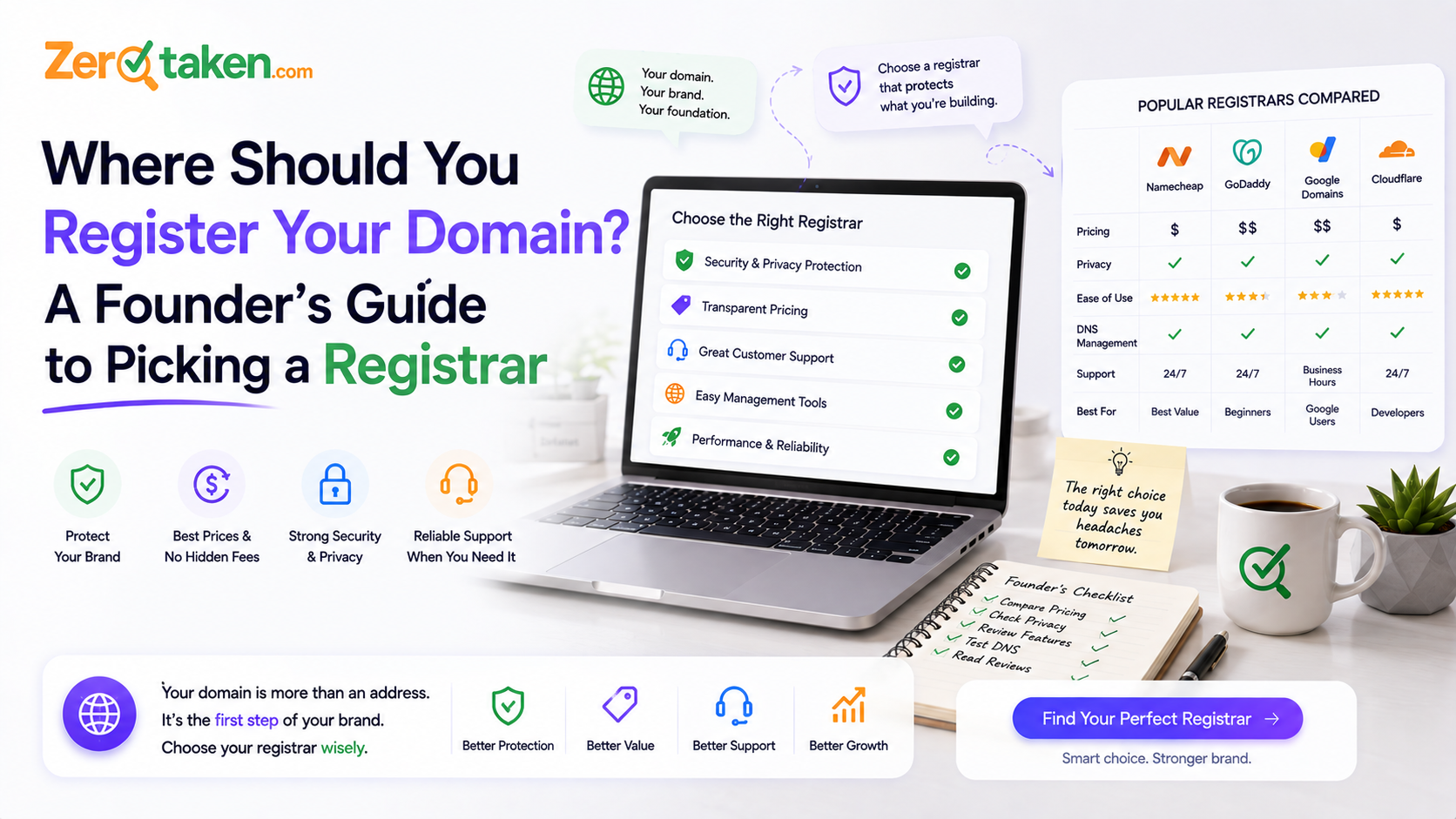
¿De verdad importa dónde registras tu dominio?
Sí — aunque no de la forma en que las páginas de marketing dan a entender. Un dominio es un dominio: registra ejemplo.com en cualquier sitio y se resuelve igual, apunta adonde le digas y funciona de forma idéntica en un navegador. El registrador no hace que tu sitio sea más rápido ni tu nombre más valioso. Así que la elección no va de rendimiento; va de las condiciones de una suscripción que pagarás mientras exista tu empresa.
Tres de esas condiciones sí importan de verdad, y son las que las páginas de pago entierran. La primera es el precio de renovación — lo que pagas en el segundo año y en cada año siguiente, que casi nunca es el número del anuncio. La segunda es si la protección de privacidad es gratuita, porque sin ella tu nombre, dirección y correo electrónico pueden acabar en el registro público de WHOIS. La tercera es cómo se comporta el registrador cuando quieres irte: algunos convierten las transferencias en un trámite de dos clics, otros las convierten en un calvario de tickets de soporte. Elige en base a esas tres, y el logotipo de la factura deja de importar.
¿Por qué el precio del primer año es una trampa?
Porque el primer año es un gancho de venta con pérdidas, y la renovación es el producto real. Los registradores anuncian un .com por 0,99 $ o 1 $ de la misma forma que un gimnasio anuncia el mes de inscripción — el número que te ata es el que no ves hasta más tarde. Ese nombre de 0,99 $ se renueva entre 15 $ y 20 $, y pagarás la renovación muchas más veces de las que pagaste el precio inicial. En cinco años, un registrador con un primer año de 9 $ y una renovación de 12 $ cuesta menos que uno con un primer año de 1 $ y una renovación de 22 $, aunque este último parezca más barato en el anuncio.
Así que haz el único cálculo que cuenta: averigua el precio de renovación antes de comprar, no el precio promocional. La mayoría de los registradores lo indican en la letra pequeña o lo muestran si pones la duración del registro en dos años — el segundo año se cobra a la tarifa real. Si un registrador oculta su precio de renovación o te obliga a buscarlo, tómalo como respuesta. Los que confían en su valor a largo plazo colocan el número de renovación justo al lado del número inicial.
- Busca el precio de renovación del segundo año, no la promoción del primer año — eso es lo que pagarás durante años
- Una tarifa inicial baja con una renovación alta pierde frente a una tarifa justa que se mantiene estable
- Vigila un recargo de renovación aparte en .io, .ai y otras extensiones premium
- Si el precio de renovación es difícil de encontrar, eso es una señal, no un accidente
¿Qué debería incluir gratis un buen registrador?
Una lista corta de cosas que algunos registradores incluyen y otros te venden por separado. Lo más importante es la privacidad WHOIS — el servicio que sustituye tu nombre personal, dirección y correo electrónico en el registro público del dominio por un proxy. Todo dominio registrado tiene un registro WHOIS, y sin privacidad, el tuyo puede exponer tu dirección de casa y un correo electrónico imán de spam a cualquiera que haga una consulta. Los buenos registradores incluyen la privacidad de forma gratuita, de por vida. Otros cobran entre 5 $ y 10 $ al año por ocultar información que podrían haber ocultado gratis.
El resto de la lista de cosas gratuitas trata de que no te cobren por partes lo que debería ser básico. La gestión completa de DNS (para poder apuntar el dominio a cualquier host, añadir correo, configurar subdominios) debería estar incluida y sin límites. La autenticación de dos factores en tu cuenta debería ser estándar, porque tu dominio es tan seguro como el inicio de sesión que lo controla. Un bloqueo de registrador (también llamado bloqueo de transferencia) que impida transferencias no autorizadas debería estar activado por defecto. Ninguna de estas es una función premium — son lo mínimo esperable, y pagar extra por cualquiera de ellas es una señal de que estás en el registrador equivocado.
- Privacidad WHOIS gratuita, permanentemente — no como complemento de pago ni como regalo solo del primer año
- Gestión completa e ilimitada de registros DNS, sin niveles premium ni por registro
- Autenticación de dos factores en la cuenta que controla el dominio
- Bloqueo de registrador/transferencia activado por defecto para impedir transferencias no autorizadas
¿Qué extras del checkout puedes rechazar sin problema?
El checkout de dominios es un pasillo de ventas adicionales diseñado para convertir una compra de 12 $ en una de 60 $, y casi todo en él es opcional. El 'DNS premium' es innecesario para una startup normal — el DNS gratuito funciona bien hasta que operas a una escala en la que sabrías que necesitas más. Los complementos de 'seguridad del sitio web' o 'SiteLock' protegen un sitio web que todavía no has construido y a menudo duplican lo que ya ofrece tu proveedor de hosting. El alojamiento de correo incluido merece la pena tenerlo eventualmente, pero no tienes que comprarlo a tu registrador en el checkout, y normalmente conseguirás mejor trato eligiendo un proveedor de correo a propósito más adelante.
Hay dos cosas en ese checkout que sí merece la pena conservar. Activa la renovación automática — la forma más común en que los fundadores pierden un dominio es olvidándose de renovarlo, y la renovación automática es un seguro gratuito contra eso. Y si la protección de privacidad es una partida de pago en lugar de gratuita, consérvala de todos modos; una dirección postal pública no vale la pena ahorrarse nueve dólares. Todo lo demás — los años extra que aún no necesitas, los paquetes de seguridad, los complementos de marketing — puedes rechazarlo ahora y añadirlo más tarde si algún día realmente lo necesitas. Las opciones por defecto están configuradas para beneficiar al vendedor; desmárcalas primero, y añade después solo lo que vayas a usar.
- Rechaza: DNS premium, paquetes de 'SiteLock'/seguridad del sitio, herramientas de marketing incluidas
- Rechaza por ahora: pago anticipado de varios años y alojamiento de correo — añádelos deliberadamente más adelante
- Conserva: la renovación automática (protección gratuita contra perder el nombre por accidente)
- Conserva: la protección de privacidad aunque cueste extra — una dirección pública no vale el ahorro
Registrador, revendedor o tu proveedor de hosting: ¿a quién le estás comprando en realidad?
Hay una diferencia entre comprar un dominio a un registrador dedicado y conseguir uno 'gratis' con un creador de sitios web o un paquete de hosting, y esa diferencia aparece el día que quieres mudarte. El negocio entero de un registrador de verdad son los dominios; irse es una acción normal y respaldada. Una empresa de hosting o un creador de sitios que te regala un dominio lo incluye para retenerte — y algunos registran el dominio bajo su propia cuenta o hacen que la transferencia de salida sea deliberadamente dolorosa, de modo que el dominio 'gratis' se convierte en una correa. La regla general: sé dueño de tu dominio en un registrador que tú controlas, y apúntalo al host que quieras, en lugar de dejar que el host sea dueño del dominio en tu nombre.
La tercera categoría es el mercado secundario — Afternic, Sedo, Dan, y las páginas de 'compra este dominio' a las que llegas cuando un nombre ya está cogido. Ahí no registras un nombre gratis; ahí compras uno que ya tiene dueño, a un precio negociado. No hay nada de malo en ello cuando el nombre lo vale, pero no confundas un anuncio de mercado secundario de 2.000 $ con el registro de 12 $ que estás haciendo aquí. Si el nombre está realmente disponible, lo registras en un registrador al precio base — nunca pagas dinero de mercado secundario por un nombre que nadie ha reclamado.
¿Cómo evitas quedarte atrapado?
Da por hecho que algún día querrás mudarte, y regístrate de forma que esa puerta quede abierta. La mecánica está estandarizada por ICANN, así que es la misma en todas partes: para transferir un dominio lo desbloqueas, consigues un código de autorización (a veces llamado código EPP o auth code) de tu registrador actual, y se lo entregas al nuevo. Un buen registrador te deja hacer todo eso tú mismo desde el panel de control en minutos. Uno malo esconde el código de autorización detrás de una solicitud de soporte, lo retrasa, o intenta convencerte de que no te vayas. No siempre puedes saber con cuál te has topado hasta que lo intentas — por eso los registradores con privacidad gratuita y renovación transparente también suelen ser los más fáciles a la hora de salir.
Dos reglas de tiempo evitan a la gente disgustos de verdad. Primero, hay un bloqueo de transferencia de ICANN de 60 días después de registrar un dominio nuevo o transferir uno — no puedes volver a moverlo durante esa ventana, así que no te registres en un registrador de relleno planeando mudarte la semana que viene. Segundo, nunca dejes que un dominio se acerque a la caducidad como plan de salida; un dominio caducado puede entrar en un periodo de redención que cuesta mucho más recuperar que una renovación normal, y en el peor de los casos se libera y alguien más lo agarra. Mantén actualizado el correo electrónico del titular, mantén activada la renovación automática, y transfiere deliberadamente en lugar de por descuido.
- Confirma que puedes desbloquear el dominio y obtener tú mismo el código de autorización (EPP), desde el panel
- Recuerda el bloqueo de 60 días tras el registro/transferencia antes de planear una mudanza
- Mantén actualizada tu dirección de correo de titular — ahí es donde llegan las aprobaciones de transferencia
- Nunca uses la caducidad como salida; las tarifas de redención superan con creces una renovación normal
¿Qué pasa después de encontrar un nombre disponible?
Todo lo anterior es la segunda mitad de una decisión cuya primera mitad es encontrar un nombre que realmente esté libre para registrar — que es la parte más difícil en 2026, cuando los .com obvios se vendieron hace años. Ese es el trabajo que hace ZeroTaken: describe tu idea, obtén candidatos que puedan convertirse en marca, y comprueba cuáles están realmente disponibles en .com, .io, .ai y .co antes de enamorarte de uno que no puedes tener. Comprueba la disponibilidad en tiempo real en lugar de adivinar, así que el nombre que llevas al checkout es uno que realmente puedes registrar al precio base, no uno ya cogido que tendrías que perseguir en el mercado secundario.
A partir de ahí, esta guía es la mitad del checkout. Una vez que tengas en la mano un nombre verificado como disponible, elige el registrador por el precio de renovación y la privacidad gratuita, rechaza los extras, activa la renovación automática, y listo — el nombre es tuyo, de forma limpia, por un coste anual predecible, en un lugar que no lo retendrá como rehén cuando crezcas.
Entonces, ¿dónde deberías registrarte?
Donde el precio de renovación sea justo y estable, la privacidad sea gratuita, e irse sea cosa de dos clics — en ese orden. Ignora por completo la promoción del primer año; es el número menos importante de la página. Un registrador con reputación cuyo negocio entero son los dominios, que publica abiertamente su precio de renovación e incluye privacidad WHOIS sin coste, vencerá a un registrador de descuentos ruidosos en cualquier horizonte de tiempo real, y no convertirá tu dominio en un rehén el día que quieras cambiar de host.
La verdad poco glamurosa es que el mejor registrador es uno aburrido: precios transparentes, privacidad gratuita, transferencias estándar, y un checkout que puedes recorrer desmarcando casillas sin perder nada que necesites. Compra el nombre en un sitio así, activa la renovación automática, rechaza los complementos, y ponte a construir lo tuyo. El dominio es infraestructura — el objetivo es ser dueño de él de forma limpia y no volver a pensar en el registrador nunca más.